
Your Finances Overview
See the cash held across your accounts, what came in and went out over the last 12 months, and every fund’s balance at a glance.
NEW Finances FREE
Bring income, expenses, budgets and year-end reporting together in the platform you already use to run your events.
With your Stripe income already recorded, your accounts have a head start.
Finances is completely FREE with your PTA Events site.

Give your accounts a head start
Tickets sold. Uniform orders paid. Donations received. Finances uses the detail already in PTA Events to record and categorise your Stripe payouts automatically.
Income and fees stay separate in your accounts. Add cash, cheques, grants and expenses to bring the rest of the picture together.
One bank statement line. A clear breakdown behind it.
Import your bank’s CSV statement and Finances suggests matches for you to accept, including a group of Stripe entries against one payout line. Record a new transaction straight from a bank line, and undo any match if it is wrong. Anything missing or ambiguous stays for you to review.

Keep receipts with the record
Bought decorations for the disco or supplies for the Christmas fair? Volunteers can photograph the receipt and submit their own expense claim.
AI helps fill in details from supported receipt images.
The claimant checks or corrects the details before submitting.
Another person approves. The treasurer marks the claim paid once payment has been made.
Receipts stay attached. Finances records payment status; it does not transfer money.
Day to day
The tools a volunteer treasurer reaches for every week, already waiting in your admin menu.
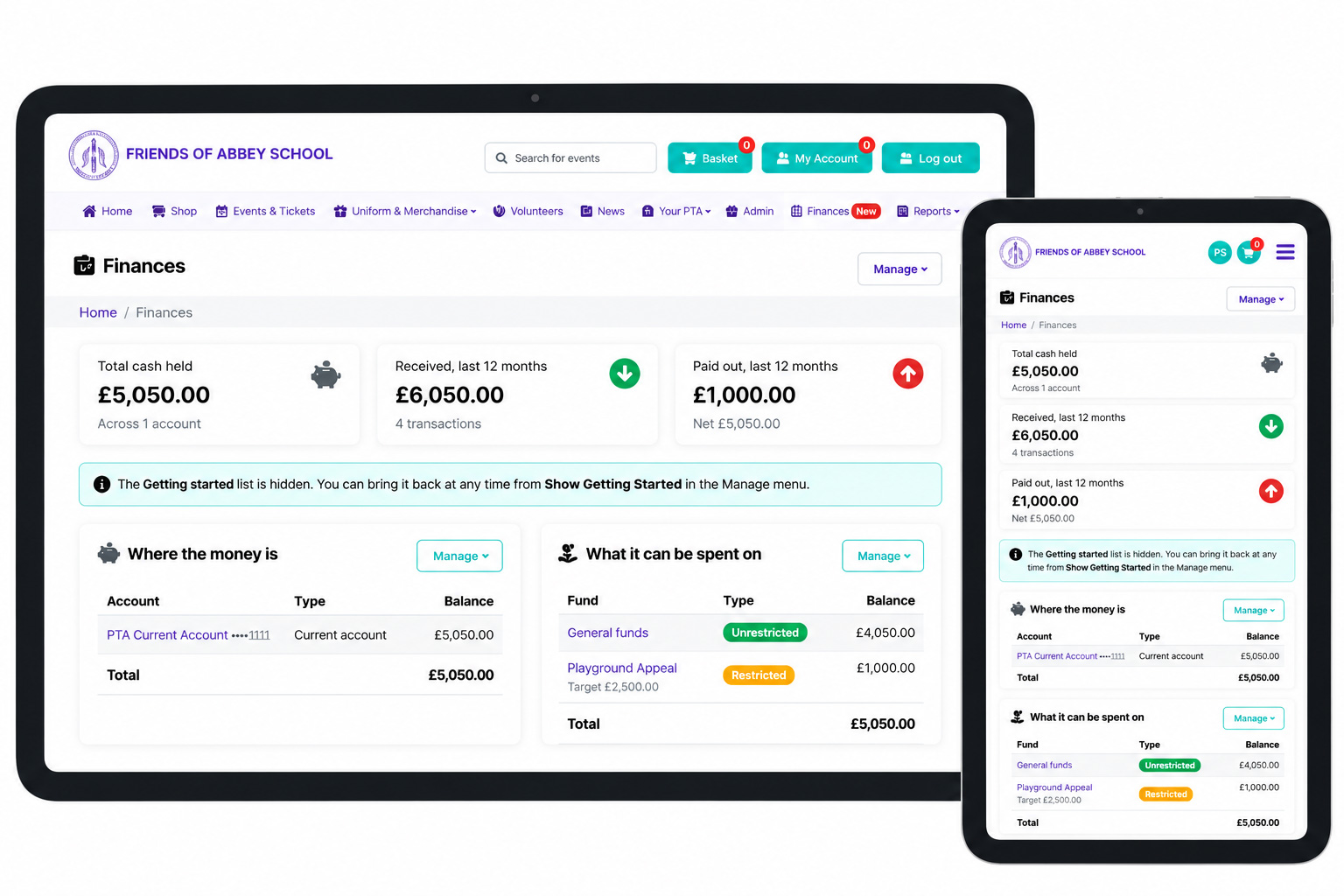
See the cash held across your accounts, what came in and went out over the last 12 months, and every fund’s balance at a glance.
Spread one payment or bank line across up to 20 categories, funds or events. The lines must add up to the penny.
Attach receipts and invoices to any transaction, not only expense claims, so the paperwork stays with the record.
Start with income and spending categories already set up, then rename, add or close them to suit your PTA.
Link income and costs to an event, then filter its receipts and payments and export them for the committee.
Nobody approves their own expense claim. Only administrators and people with the Finance role see the accounts.
Funding requests
When the school asks your PTA to pay for something, record the request in Finances. Send the school the request form, a Word document with your PTA’s name already on it, and Finances can read the completed form to fill in the details for you to check.
Once the committee approves a request, the money shows as committed against the fund it will come from, so your Overview shows what is still available to spend.
A clearer picture for your committee
Compare your annual income and spending budgets with actual figures, category by category. Copy last year’s budget forward and adjust it for the year ahead.
Prepare a receipts and payments report by fund, with your organisation’s logo, and add what the accounts cannot see for themselves: a Gift Aid reclaim still owed, equipment you own or a bill not yet paid. In England and Wales the report follows the Charity Commission’s CC16a form; in Scotland and Northern Ireland it includes a statement of balances.
Download an examiner pack with the report, transaction list, reconciliation summary and receipts for claims paid in the year, then close the year so its figures are locked.
Track current accounts, savings, cash and money held by your payment provider. Keep unrestricted, restricted and endowment funds separate, so money set aside for a particular purpose stays visible. Give a fund a target and move money between funds. Taking money out of a restricted or endowment fund needs a written reason, and an overdrawn one has to be explained before you close the year.
How it works
Payouts from your PTA Events activity are automatically recorded and categorised.
Record cash, cheques, grants and expenses from elsewhere.
Upload a bank CSV and review matched and outstanding items.
Compare budgets, prepare reports and get ready for year end.
A few useful details
Your feedback helps us make Finances more useful for volunteer treasurers.
Yes. Finances is completely FREE with your PTA Events site. Your usual platform and payment processing fees still apply to transactions.
There is nothing to switch on or install. Finances is already in the admin menu of every PTA Events site for administrators and anyone with the Finance role. Open Finances, choose Set up on the Overview page, and follow the short checklist. If you cannot see the Finances menu, check that your account has the Administrator or Finance role.
No. You upload a CSV statement exported from your bank. Finances does not ask for banking credentials and cannot move money.
Stripe payouts from activity through PTA Events are automatically posted and categorised. You record other income, such as cash, cheques and grants, alongside expenses and other payments.
Budgets currently work by category across the financial year, rather than by individual event. You can link transactions to an event and review its receipts and payments. We welcome feedback about what else would help.
No. AI helps pre-fill receipt details. The claimant checks or corrects them before submitting, and another person approves the claim. Details can be entered manually if automatic reading is unavailable.
Finances produces receipts and payments accounts, rather than accrual accounts. The reporting presentation reflects your organisation’s country setting. Check that this is the appropriate accounting basis for your organisation.
Already with PTA Events? Finances is already in your admin menu: open it and choose Set up. New here? Register and it is included from day one.
Register freeFinances is completely FREE with your PTA Events site. Usual transaction fees still apply.